

AI agents can follow different valid paths to the same task, making exact-match testing unreliable. Effective tests assess tool selection, arguments, execution order, and final outcomes across repeated runs, while allowing multiple successful trajectories.
A reliable testing strategy combines focused checks for individual decisions with end-to-end trajectory evaluations, pre-release regression tests, and continuous production scoring. Production failures should be treated as new evaluation cases so the test suite keeps pace with real agent behavior.
This guide explains how to create reproducible test environments, write scoring criteria that reflect what the agent must actually get right, and enforce quality thresholds before release. Braintrust connects traces, datasets, and scorers so teams can turn observed failures into evaluations and use the results to control what reaches production.
Why testing AI agents is different from testing traditional software
Traditional software tests usually assume a deterministic relationship between input and output. A function receives an input, returns a value, and passes when the result matches the expected value. Exact-match assertions still work for deterministic code around an agent, but they become unreliable once the model starts choosing what to do next because more than one sequence or response may be correct.
This guide uses a customer support agent that can look up an order, check the refund policy, issue a refund, and notify the customer. When a user requests a refund for a late delivery, the model chooses which tools to call and in what order. Agent evaluation measures both the final outcome and the sequence of decisions that led to it. Non-determinism, multi-step execution, and state-changing tool calls make final-output assertions insufficient.
Non-determinism breaks exact-match assertions
Running the same refund request twice may yield two valid routes: the agent might look up the order first in one run and check the refund policy first in another. Both routes can be correct when the required checks are performed before the refund, and the system reaches the correct final state. An exact match on the closing message can also fail because the wording changes even when the outcome remains correct.
Agent tests therefore score behavior against defined criteria. In Braintrust, each scorer returns a value between 0 and 1, a threshold determines whether the run passes, and repeated trials show how consistently the agent meets the criteria.
Multi-step execution hides where the failure started
A refund that never reaches the customer can fail at several points. The agent may retrieve the wrong order, pass a customer ID where the refund tool expects an order ID, misread the tool response, or omit the confirmation from its closing message. A final-output assertion flags the failed run but cannot identify which step caused it.
Braintrust can trace application logic so each tool call records its inputs, outputs, and errors in a separate span. The span that failed then points to the prompt, tool description, or schema responsible for it.
Tool calls change real state
Because the support agent moves money and sends email, running a test suite against live services could issue real refunds and contact actual customers. Braintrust's guidance for offline agent evaluations recommends stubbing external dependencies with enough state from production or staging to simulate the databases and APIs the agent uses. Controlled services keep results reproducible and prevent test runs from changing live data.
Single-response model tests do not need to evaluate multi-step tool use or state changes. The How to test AI models guide covers single-prompt testing separately.
Unit tests vs. evals for AI agents
Agent applications need both unit tests and evals because deterministic code and model-driven behavior require different forms of validation.
| Dimension | Traditional unit test | Agent eval |
|---|---|---|
| Assertion | Fixed condition with a pass or fail result | Defined criteria scored individually or against a pass threshold |
| Runs per case | Typically once per test execution | Once by default, with repeated trials to measure variation |
| Scope | One deterministic function or component | A model output, intermediate agent step, or complete run |
| Failure signal | Failed assertion with expected and actual values, sometimes accompanied by a stack trace | Scores on the eval result, with step-level traces available when the task is instrumented |
| Case sources | Requirements, contracts, edge cases, and known bugs | Curated datasets that may include specifications, production traces, user feedback, and incidents |
A Braintrust eval combines a dataset, task, and scorer to define what runs and how its quality is measured. Teams can then use the same evaluation criteria as product acceptance requirements, giving product, engineering, and QA a shared definition of the behavior an agent must demonstrate before release.
The four layers of AI agent testing
AI agent testing needs to catch failures at different points, from one decision during development to behavior observed after deployment. A complete strategy covers four layers: single-step evaluations, trajectory evaluations, regression suites, and production monitoring.
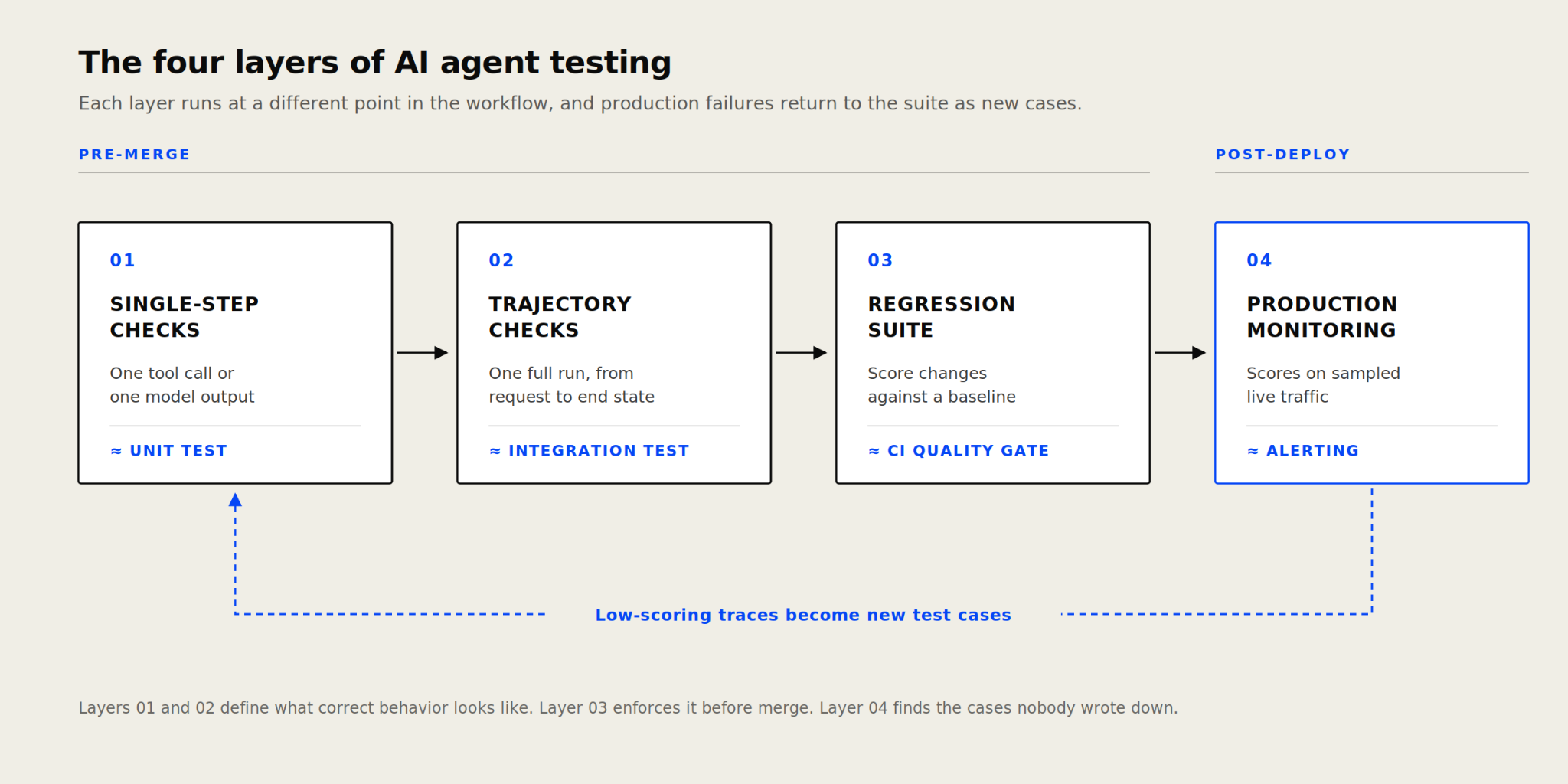
Production failures expand pre-release coverage by becoming new evaluation cases.
Single-step evaluations isolate decisions such as tool selection and argument generation, while trajectory evaluations assess whether the complete run reaches the expected outcome. Both can run during local development and on pull requests, where failed cases are easier to investigate.
Regression suites compare changes against a stable dataset in CI and can block a merge when scores fall below an accepted threshold. After deployment, production monitoring scores sampled traces to uncover inputs and failure patterns missing from the dataset. Reviewed failures can then become evaluation cases for future releases.
Braintrust's AI agent evaluation framework explains how to choose metrics for reasoning, tool use, task completion, and safety across these layers.
How to test single-step agent behavior: tool calls and model outputs
Single-step evaluations hold the surrounding scenario constant and test one agent decision, making failures easier to locate before the complete trajectory is evaluated. Four checks cover the most common failure points.
Tool selection: Confirm that the agent chose the tool required for the request. An order-related question should call lookup_order before the agent considers issue_refund.
Argument construction: Check that the tool call includes the required fields, uses the expected data types, and does not introduce values absent from the available context. For example, a refund call should not place a customer ID in the order ID field.
Output format: Validate structured outputs against the schema expected by the next step. Missing fields, invalid types, or malformed objects can prevent later steps from running correctly.
Response quality: Score responses on criteria such as relevance, adherence to instructions, and grounding in the supplied context. Open-ended responses often require an LLM-as-a-judge scorer or human review, as multiple answers may be acceptable.
Tool selection, arguments, and structured outputs can usually be checked with deterministic code. Each case should also retain the preceding step's input because an apparent decision failure may originate in the context that the agent received.
To make tool-call data available to a Braintrust eval scorer, add it to the current evaluation's metadata through hooks. The Python example below records the calls whenever the model returns tool_calls.
async def task_func(input: str, hooks=None) -> str:
    # ...
    if rsp.choices[0].finish_reason == "tool_calls":
        tool_calls = rsp.choices[0].message.tool_calls
        hooks.metadata["tool_calls"] = tool_calls
    # ...
The scorer can then compare the recorded tool name and arguments with the expected values in the dataset without executing the task again. Braintrust's guide to writing scorers covers the supported scorer formats and inputs.
How to test agent trajectories across a full run
A trajectory records the steps from the user's request to the system's final state. Even when individual tool selections pass their checks, the complete run may repeat calls, violate a dependency, or stop before completing the requested action. Trajectory evaluations catch these failures by jointly assessing the execution sequence and the resulting state.
Braintrust's while-loop agent cookbook shows a typical agent loop in which the model either requests a tool or returns a final response. After each tool request, the result is added to the message history and the model runs again until it completes the task.
while (!done) {
  const response = await callLLM();
  messages.push(response);
  if (response.toolCalls) {
    messages.push(
      ...(await Promise.all(response.toolCalls.map((tc) => tool(tc.args)))),
    );
  } else {
    done = true;
  }
}
In the cookbook's complete implementation, each loop iteration is recorded separately in the trace so the evaluation can inspect individual steps and their order. Independent steps may occur in different sequences, while dependencies that determine correctness must remain fixed.
The following four checks catch the failures that single-step evaluations cannot see.
Required tools: Confirm that the run called every tool needed for the request and avoided unrelated or prohibited tools. A refund request may require check_refund_policy, but it should not invoke update_subscription.
Dependency order: Verify sequencing requirements that affect correctness, such as checking the refund policy before issuing the refund. Tool order can usually be evaluated with deterministic code.
Final state: Assert that the expected changes exist in the stubbed services. The refund record should be present and the order status updated, even if the closing response indicates the action succeeded.
Step count: Define an acceptable range that covers valid execution paths. A sustained increase after a prompt or tool description change can reveal repeated calls, an unexpected loop, or instructions the agent has begun to misinterpret.
How to build an AI agent test suite
A working test suite draws on representative cases, defines the outcome each one should reach, and runs against dependencies under your control.
Start with real traffic: Build the initial cases from reviewed production traces, support requests, and past incidents. Synthetic cases can target additional scenarios, but they should not be the sole source, as they rarely capture the language and failure patterns observed in real usage.
Cover four case categories: Include happy-path cases for expected behavior, edge cases for boundary conditions, adversarial cases that attempt to break the agent, and off-topic cases that confirm it rejects requests outside its scope.
Stub external dependencies: Recreate enough state for services such as the payment API, order database, and email system to behave consistently. Reset that state before each trial so one run cannot affect the next.
Repeat cases to measure consistency: Braintrust supports multiple trials per input via trial_count, and an experiment can then measure variation across runs. Set the count according to the consistency requirement and the cost of executing each case.
Eval(
    "My Project",
    data=my_dataset,
    task=my_task,
    scores=[Factuality],
    trial_count=10,  # Run each input 10 times
)
Version cases with the changes they cover: Add code-defined cases in the same pull request as the prompt, tool, or agent change they test. Braintrust datasets maintain version history and support snapshots, while git metadata connects each experiment to the code version that produced it.
Start with a reviewed set that covers the main task and known failures, then expand it as new production cases appear. Teams can build an eval in the Braintrust UI to define cases and scorers without writing code, or run an evaluation locally to create a persistent experiment from an eval file.
How to run AI agent regression tests in CI
Agent regression testing becomes enforceable when the evaluation suite runs automatically for every relevant change, and its results can affect whether the change is merged.
Compare against a baseline: Compare each pull request run with a known-good experiment created from the same dataset. The braintrustdata/eval-action runs evaluations in GitHub Actions and posts a pull request comment summarizing score changes, improvements, and regressions against the baseline.
Set blocking conditions: A score threshold becomes a quality gate when failing it can prevent a merge. Release-critical measures such as task completion and safety can block the pipeline, while step count, latency, and cost can remain warnings unless the application has fixed limits for them.
Keep pull request runs fast: Running every case across several trials can increase execution time and model costs. Use a non-final subset for pull requests, then run the complete dataset after merge.
bt eval tests/ --first 20 --no-input --json # smoke run on PR, non-final
bt eval tests/ --no-input --json # full run on merge, final
Define failures precisely: By default, bt eval returns a non-zero exit code when an evaluation throws an exception. A custom Reporter() can also evaluate the completed results and return false when specified score conditions are not met, causing the CI run to fail.
When a score regresses, the experiment comparison identifies the affected cases and retains the corresponding traces for investigation. Braintrust's guide to CI/CD integration explains how automated evaluations can govern the broader release process.
How to monitor AI agents in production after deployment
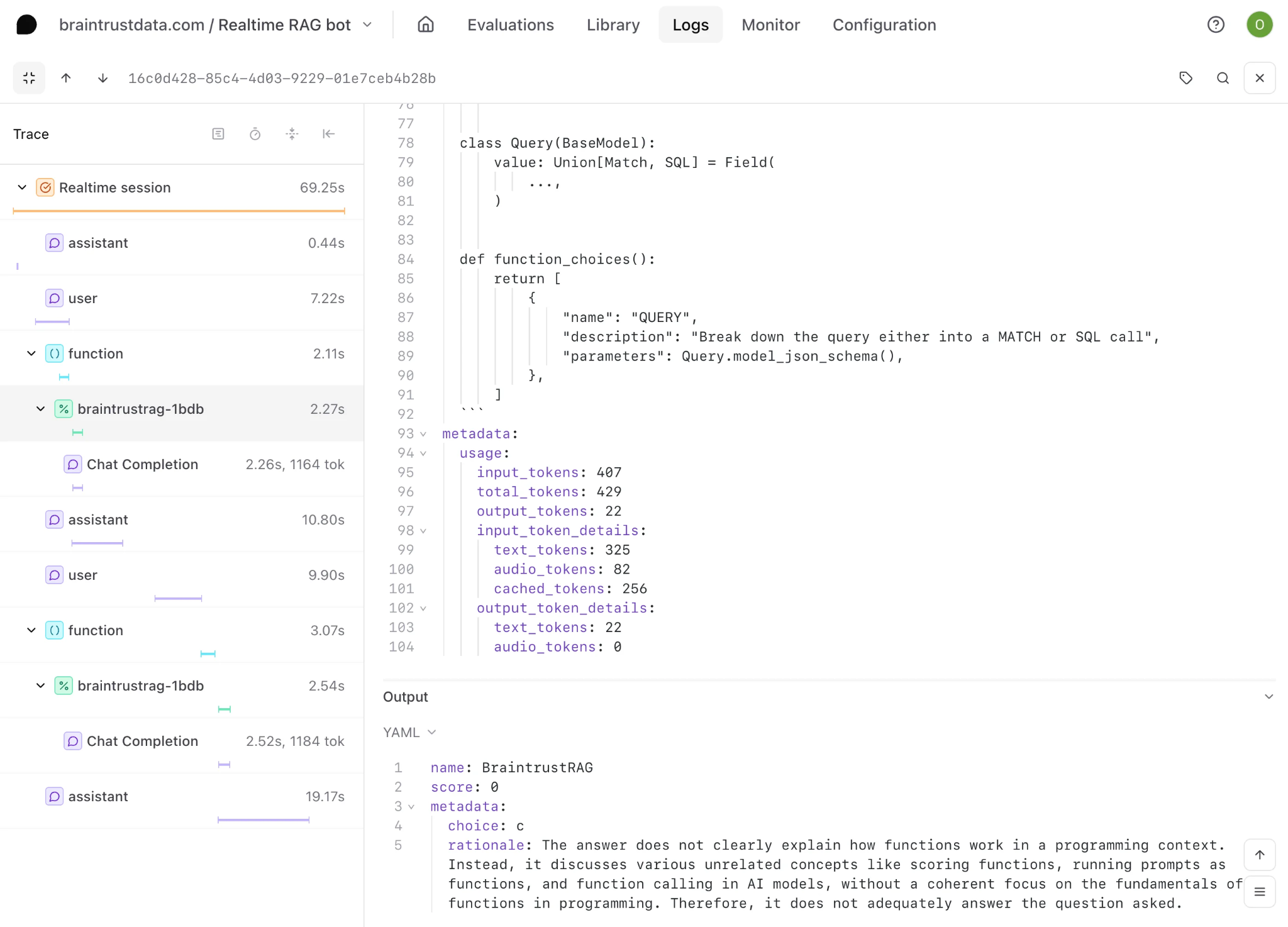
Online scoring attaches scores and rationales to sampled production traces, so a failed agent run can be reviewed with its tool calls and outputs intact.
Offline evaluations measure only the inputs represented in the dataset. Production monitoring extends coverage to real requests, where unfamiliar language, changing tool states, and unanticipated execution paths can expose behavior the pre-release suite did not test.
Score production traces: Use LLM-as-a-judge scorers to assess criteria such as hallucination, tool accuracy, and goal completion when no reference answer is available. Braintrust runs online scoring asynchronously, so evaluations do not add latency to user requests.
Adjust sampling as traffic changes: Score all requests to establish an initial quality baseline, then adjust the sampling rate based on agent stability and traffic volume. Higher-risk actions may warrant broader coverage even after performance becomes consistent.
Collect user feedback: Attach ratings, corrections, and comments to the relevant trace. User feedback in Braintrust surfaces cases that automated scorers miss and marks traces worth a closer read.
Alert on quality and operational signals: A request can return a successful HTTP response while the agent completes the wrong action, such as refunding the wrong order. Braintrust log alerts can notify teams through Slack or webhooks when traces match conditions for low scores, errors, or unusually high costs.
Add reviewed traces to the test suite: Low-scoring traces can capture failures missing from the original dataset, while unusually high-scoring traces may reveal valid execution paths that deserve coverage. Promote selected examples into the offline dataset so future CI runs evaluate changes against behavior observed in production.
Production monitoring feeds new cases into the regression suite, and CI then holds later changes to the thresholds those cases establish.
Why teams use Braintrust for AI agent testing
Braintrust applies consistent evaluation criteria across single-step checks, complete agent runs, CI regression tests, and production scoring. Product, engineering, and QA teams can review the same scores and traces, agree on release thresholds, and prevent changes that fail those thresholds from reaching production.
Notion keeps 70 engineers aligned on evaluation through Braintrust and deploys new frontier models within hours of release, and engineering teams at Stripe, Vercel, Instacart, Zapier, and Ramp test their agents the same way. Any team can start on the free plan, which includes 1 GB of processed data and 10,000 scores per month, with no limits on users, projects, datasets, playgrounds, or experiments.
Use evaluation results to control what reaches production. Start free with Braintrust.
FAQs: How to test AI agents (2026)
How do you test an AI agent before shipping?
Define release criteria for successful task completion and safe failure handling. The agent should stay within its tool permissions, recover from service errors, escalate requests it cannot complete safely, and leave external systems in a valid state. Shipping should require an acceptable pass rate, with no unresolved failures related to safety, permissions, or irreversible actions.
What is the difference between unit tests and evals for AI agents?
Unit tests verify fixed contracts in deterministic code, such as whether a refund function rejects an invalid order ID. Evals measure model-driven behavior, in which several outputs or execution paths may be acceptable. Agent applications need both because an eval cannot prove that the underlying tool works correctly, while a unit test cannot judge whether the model made an appropriate decision.
How do you set up automated evaluations for a multi-agent LLM workflow in production?
Use a shared trace context across all agents and services so that each handoff remains part of the same execution record. Evaluate each agent's assigned responsibility against the final outcome, then group production results by agent, workflow version, and failure type so alerts can identify the agent or handoff responsible for a quality regression.
What tools are useful for testing AI agents?
A useful setup combines a standard test runner, controlled substitutes for external services, and an agent-evaluation system. Pytest, Jest, or Vitest can validate deterministic code, while mock servers and disposable databases keep state-changing tests safe. Braintrust can manage behavioral evaluations and connect their results with development and production traces.
How many test cases does an AI agent test suite need?
There is no universal target. Include cases for every release-critical user goal, tool permission boundary, escalation path, and known failure, plus combinations where one tool depends on another. The suite has sufficient coverage when each critical behavior is represented, and every new case adds a user scenario, tool boundary, or failure mode that is not already covered.